Introduction & Operational Workflow
In this guide, I’ll walk you through the process of creating a home lab for a Security Operations Center (SOC) using Oracle VirtualBox. The goal is to detect malicious activity, improve incident response, and automate actions to cut down response time and reduce manual work.
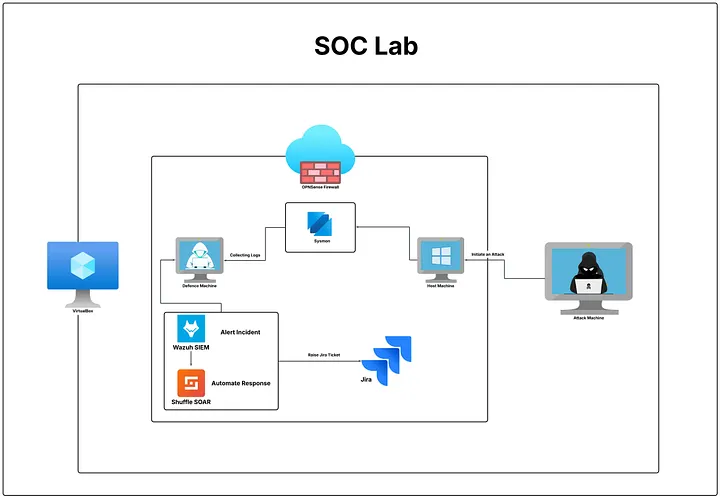
Environment Components & Workflow
- Kali Linux: Attacker machine located outside the firewall.
- Windows 10 Host: Client machine equipped with Microsoft Sysmon for granular endpoint telemetry.
- Ubuntu Machine: Defense and server host within the internal subnet.
- OPNsense Firewall: Gateway filtering traffic between bridged WAN and the internal network.
- Wazuh (SIEM): Aggregates and correlates logs from network and endpoints.
- Shuffle (SOAR): Receives webhooks on critical alerts to trigger automated containment and ticketing.
1. Wazuh agents forward real-time logs to Wazuh Cloud.
2. Rule correlations detect malicious activity (e.g., brute-force attacks).
3. An alert triggers a webhook payload directly into Shuffle SOAR.
4. Shuffle checks cache to eliminate duplicate alerts and logs a Jira incident ticket.
5. The offending IP is automatically dispatched to OPNsense to block traffic.
Virtual Environment Provisioning
1. Kali Linux (Attacker Machine)
- OS Type: Linux, Debian (64-bit)
- RAM: 2 GB to 4 GB
- Network: Bridged Adapter

2. OPNsense (Firewall Appliance)
- Type: BSD / FreeBSD (64-bit), 3 GB RAM, 10–20 GB Disk
- Adapter 1: Bridged (WAN)
- Adapter 2: Internal Network (LAN, named
intnet)

3. Windows 10 Host & Sysmon
Internal network adapter connected to intnet.


4. Ubuntu (Defense Node)

Wazuh Cloud SIEM & Agent Deployment
We utilize the Wazuh Cloud Console to establish a centralized analytics and log repository:


Deploying the Wazuh Agent on Windows:


Configuring Custom Alerting Rules in Wazuh
In Wazuh → Alerting, create a custom monitor to detect repeated authentication failures:
- Monitor Name: Failed Login Monitor
- Type: Per query monitor (Frequency: 1 minute)
- Index:
wazuh-alerts - Query Filter:
rule.id = 60122 - Trigger Condition: Count IS ABOVE 5


Automated Orchestration with Shuffle SOAR
Sign in to Shuffle Cloud and create an incident response workflow:

Automated Workflow Pipeline
- Webhook Trigger: Ingests the JSON alert payload from Wazuh.
- Data Parser: Extracts timestamps, attacker IP, and target host.
- Cache Deduplication: Verifies alert IDs to prevent duplicate alerts.
- Ticketing Dispatch: Automatically creates an issue in Jira.

Incident Tracking via Jira Cloud
Authenticate Jira Cloud within Shuffle using an API token to generate structured tickets automatically upon verified attack alerts:

Conclusion & Learning Takeaways
Setting up and analyzing this environment demonstrates how security operations function in practice: bridging telemetry collection, automated detection, threat containment, and cross-team incident tracking.
This lab provides a realistic sandbox for practicing detection engineering and SIEM/SOAR integration. Keep experimenting, test new Sigma/YARA rules, and continue expanding your blue team defense capabilities!